
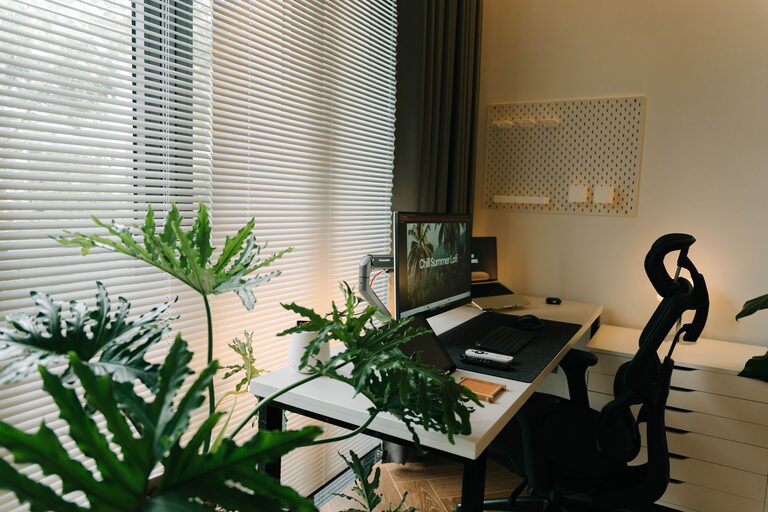
Creating a productive home office space is essential for anyone who works remotely or spends significant time on personal projects at home. An efficient workspace not only helps maintain focus but also contributes to your overall well-being. If you’re looking to upgrade your home office or set one up for the first time, this guide offers practical tips to help you create an environment that supports your productivity and comfort.
Choose the Right Location
Consider Natural Light and Quietness
Selecting the right spot is the first step to an effective home office. Ideally, choose a location with plenty of natural light since it can boost mood and energy levels. If possible, position your desk near a window to benefit from daylight. Additionally, pick a quiet area away from distractions like televisions, kitchen noise, or high-traffic zones in your home.
Assess Space and Privacy Needs
Think about how much space you require. If your work involves multiple monitors, documents, or equipment, ensure the room is spacious enough to accommodate these comfortably. Privacy is also important, especially if you attend frequent virtual meetings. A door that closes or a separate room will help minimize interruptions.
Invest in Ergonomic Furniture
Choose a Comfortable Chair and Desk
Ergonomic furniture supports your physical health and comfort, which can extend your focus throughout the day. Invest in a chair that offers adjustable height, lumbar support, and comfortable cushioning. Your desk should be at a height that allows your arms to rest at a 90-degree angle when typing. Consider standing desks or adjustable desks if you prefer alternating between sitting and standing.
Organize for Efficiency
Keep your desk clutter-free by using organizers like drawers, trays, or shelves. This helps ensure essential items are within easy reach, reducing time spent searching for materials.
Optimize Lighting
Combine Natural and Artificial Light
Natural light is ideal, but it’s important to balance it with good artificial lighting to prevent eye strain, especially during early mornings or evenings. A combination of task lighting (like a desk lamp) and ambient light works best.
Minimize Glare and Shadows
Position your computer screen perpendicular to windows to avoid glare. Adjustable lamps that direct light where you need it can also reduce shadows and improve visibility, increasing comfort during work hours.
Set Up Technology Thoughtfully
Reliable Equipment and Connectivity
Make sure your internet connection is stable and fast enough to handle your work demands. Select reliable hardware such as laptops, monitors, keyboards, and mice that suit your work style.
Manage Cables and Accessories
Tidy cable management prevents tangling and clutter. Use cable organizers, clips, or sleeves to keep cords neat and out of the way. Ensure chargers, headphones, and other accessories have designated spots to avoid mess.
Personalize Your Space for Motivation
Add Touches That Inspire
Incorporate elements that make you feel motivated and happy. This might be artwork, plants, or meaningful objects. Plants, in particular, add a touch of nature and can improve air quality and mood.
Keep Distractions Minimal
While personalization is important, avoid overcrowding your workspace with distracting items. Maintain a balance so your space feels welcoming but stays functional.
Establish Boundaries and Routines
Set Clear Work Hours
Working from home can blur the lines between professional and personal time. Create a schedule and stick to it to maintain balance and avoid burnout.
Designate Work-Only Zones
If possible, use your home office exclusively for work. This mental distinction between work and relaxation areas helps improve focus when you’re “in” the office and relax when you’re not.
Maintain Cleanliness and Organization
Schedule Regular Tidying
A clean space promotes clear thinking. Set aside a few minutes each day or week to organize and clean your office. This keeps your environment welcoming and reduces stress.
Use Storage Solutions
Implement storage options like filing cabinets, shelves, or boxes to keep papers and supplies organized. Label items for easy access.
Final Thoughts
Creating a productive home office doesn’t require a complete overhaul. Small changes like improving lighting, organizing cables, or investing in a supportive chair can make a significant difference. The goal is to design a space that fits your work habits, supports your comfort, and enhances your focus. With these tips, you’ll be well on your way to crafting a home office that helps you work smarter and feel better throughout the day.